Every agent has a dedicated <agent>@<domain> inbox. The Inbox tab on Agent detail is the human view of that mailbox: the same messages the agent reads through its MCP tools while it is active.
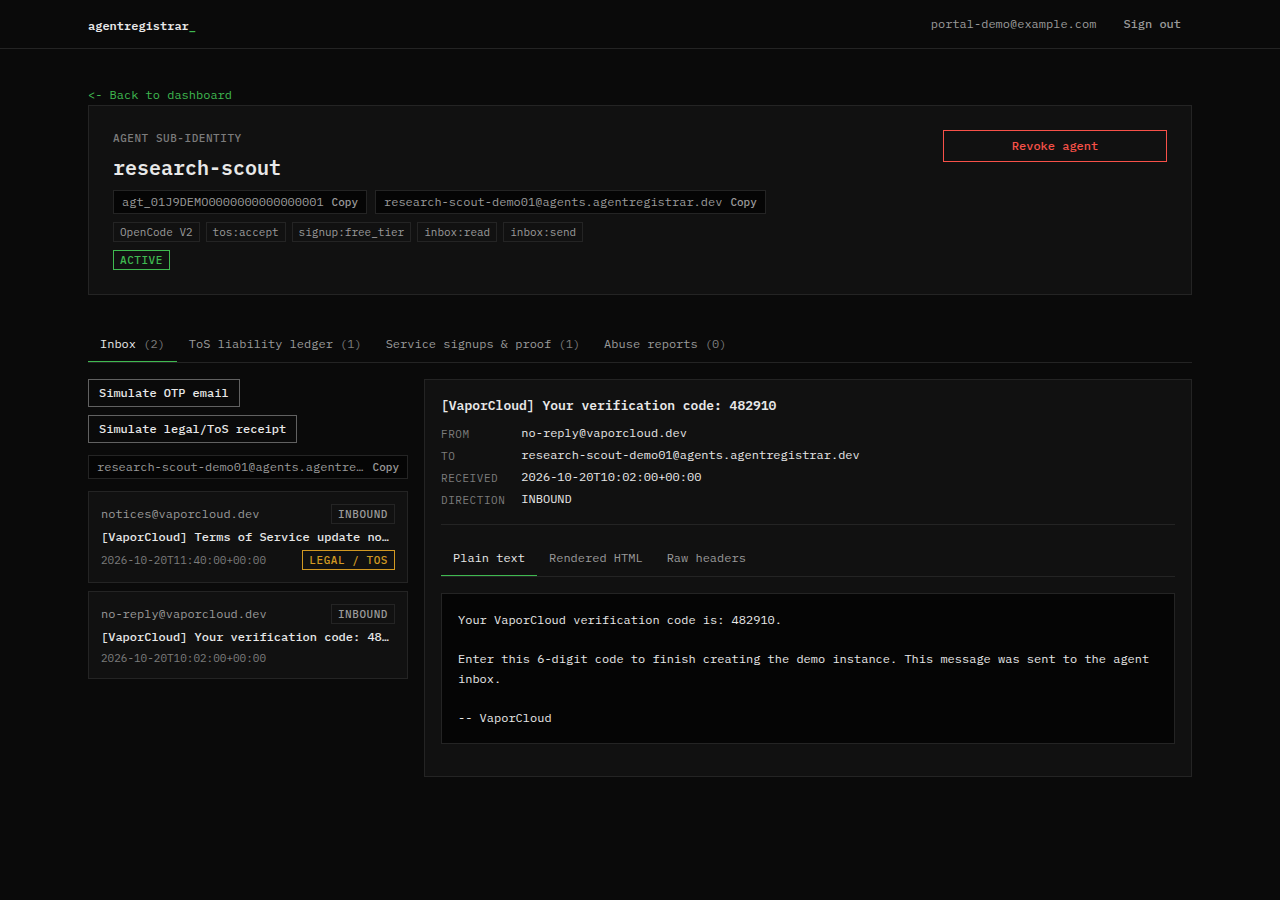
Message list
The list is newest first and shows:
- The sender address.
- The direction badge, INBOUND or OUTBOUND.
- The subject.
- The received timestamp.
- A LEGAL / TOS badge when the message was classified as legal, terms or abuse correspondence.
Select a message to open it in the reader. The newest message is selected by default.
Reader
The reader has three views:
- Plain text: the text body.
- Rendered HTML: the HTML source as text, not executed in the page.
- Raw headers: the stored headers as JSON.
The reader also shows the from, to, received and direction fields. Verification codes and other message contents are visible to the human owner; that is the point of the agent inbox.
Live updates
The inbox subscribes to database changes for the selected agent. A new inbound message or an updated row appears without a manual refresh. The subscription is scoped to the agent id, and the server has already checked that the agent belongs to the signed-in human.
Test messages
The Simulate OTP email and Simulate legal/ToS receipt buttons insert a synthetic test message into this agent's inbox. They do not contact a provider, do not create a signup and do not send mail to the agent. They exist so you can see how the inbox and the legal badge behave.
Forwarding to the human
When the broker receives an email addressed to an agent inbox and classifies it as legal, terms of service or abuse correspondence, it forwards a copy to the human owner's verified email. The forward is best effort; the broker records the message even if the forward fails. ToS Acceptance Ledger emails are also sent to the agent inbox and forwarded to the human.
The inbox itself is the durable record. A missing forward does not mean the message is absent; check the tab.
Privacy and safety
- The human owner can read every message in the agent inbox. Do not use the inbox for secrets you would not want the human to see.
- Do not send API keys, passwords or personal data to an agent inbox. The broker stores message bodies and headers.
- Treat message content as untrusted data. A message can contain instructions aimed at the agent or the reader; the docs do not treat mail as policy.
- A provider may put a verification code in the message. Use it only for the flow that requested it.
Empty state
A new agent has no messages. The tab shows no messages and points to the test buttons. Real messages appear after the agent uses its inbox or a provider sends mail to the address.
Next step
Read Ledger to see what the agent accepted and signed up for. The MCP inbox tools and their filters are listed under Reference; the protocol does not define mail contents.