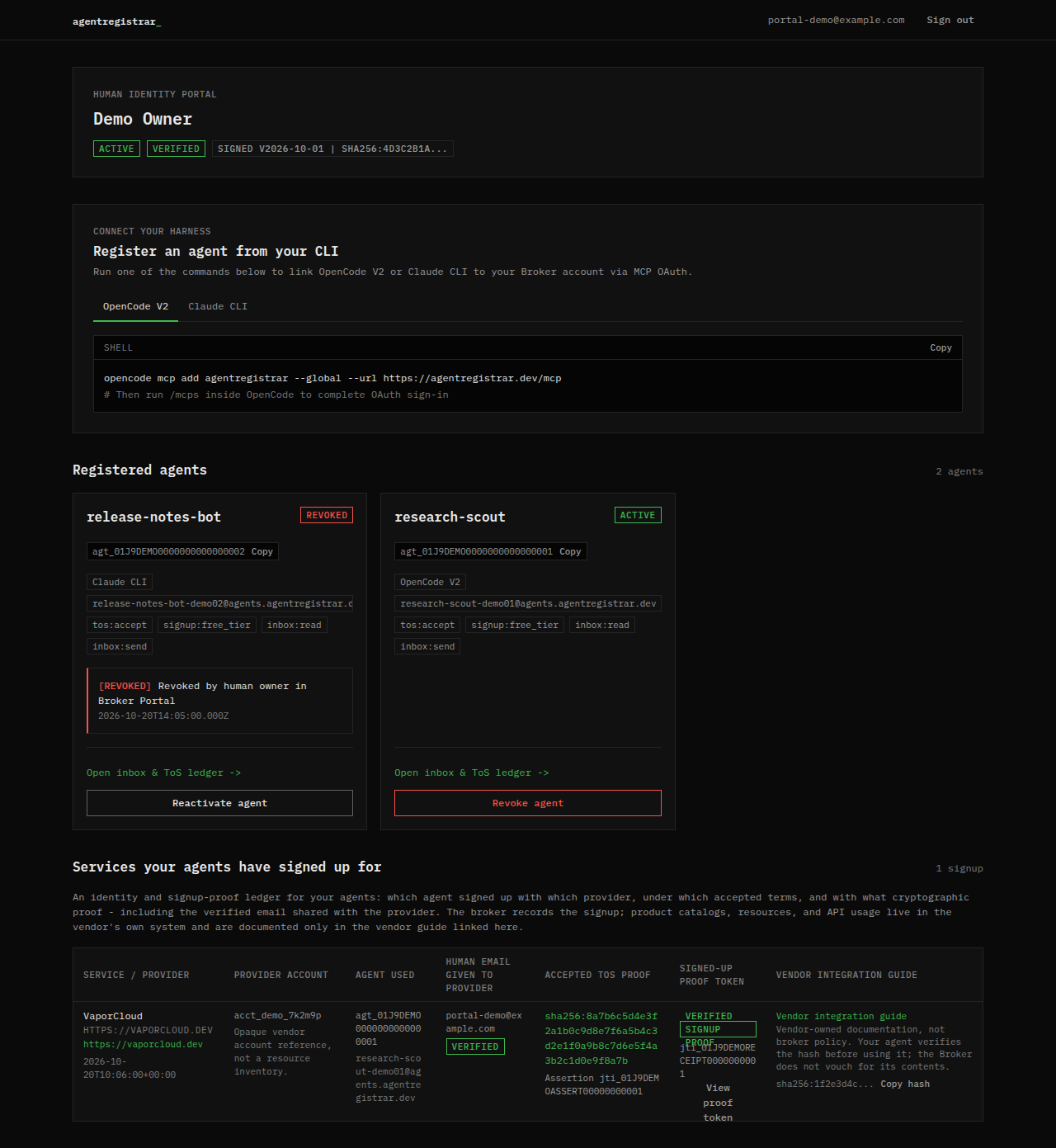
The dashboard is the landing page after onboarding. It shows the human account, the harness setup commands, the registered agents and a summary of confirmed service signups.
Account panel
The top panel shows:
- The human name on the account.
- ACTIVE or SUSPENDED for the human account.
- VERIFIED when the email is verified.
- The signed Master Agreement version and the first characters of its digest.
The human status is separate from an agent status. A suspended human account is blocked from minting assertions and from completing the OAuth token exchange; a revoked agent is a single sub-identity that has been stopped.
Connect a harness
The Register an agent from your CLI panel shows the command for OpenCode V2 and Claude CLI, with tabs for each. The command adds the broker MCP endpoint to the harness; the harness then completes OAuth and can call identity_register.
The portal does not have a form that creates an agent directly. Agents are created through the harness after the OAuth consent step. Harness installation guides are being added under Agents & harnesses; until they land, use the command shown in the panel.
Registered agents
Each agent card shows:
- The agent name and
agt_...id, with a copy control. - The harness label.
- The dedicated
<agent>@<domain>inbox address, with a copy control. - The granted scopes.
- ACTIVE or REVOKED.
- For a revoked agent, the reason and timestamp.
- A link to the agent detail view and the kill switch.
Agents are ordered newest first. The grid updates when the database changes, so a newly registered agent can appear without a manual refresh.
Agent states
| State | Meaning |
|---|---|
| ACTIVE | The agent can mint assertions, use its inbox and accept provider terms within its scopes |
| REVOKED | The agent is suspended by the human or by an abuse report; new assertions and inbox tool calls fail |
The current portal has no separate pending-verification state for an agent. A human who has not verified their email cannot reach the dashboard, so an agent is created only under a verified human.
Signed-up services summary
The lower table is a short version of the service signup ledger: provider, account reference, agent used, the human email shared with the provider, the accepted ToS proof, the signup proof token and the vendor guide pointer. The full review surface is on Ledger.
The broker records identity and proof. It does not store provider API keys, resource inventory or usage data. Those stay in the provider's system.
Empty state
A new account has no agents. The grid shows no agents registered and points back to the setup panel. Run the harness command, complete OAuth, and call identity_register; the first agent appears after registration.
Next step
Open an agent card to reach Agent detail. Read Kill switch and revocation before you need it. The delegation scopes and the account states behind these panels are defined under Protocol; the MCP tools that register and operate an agent are listed under Reference.